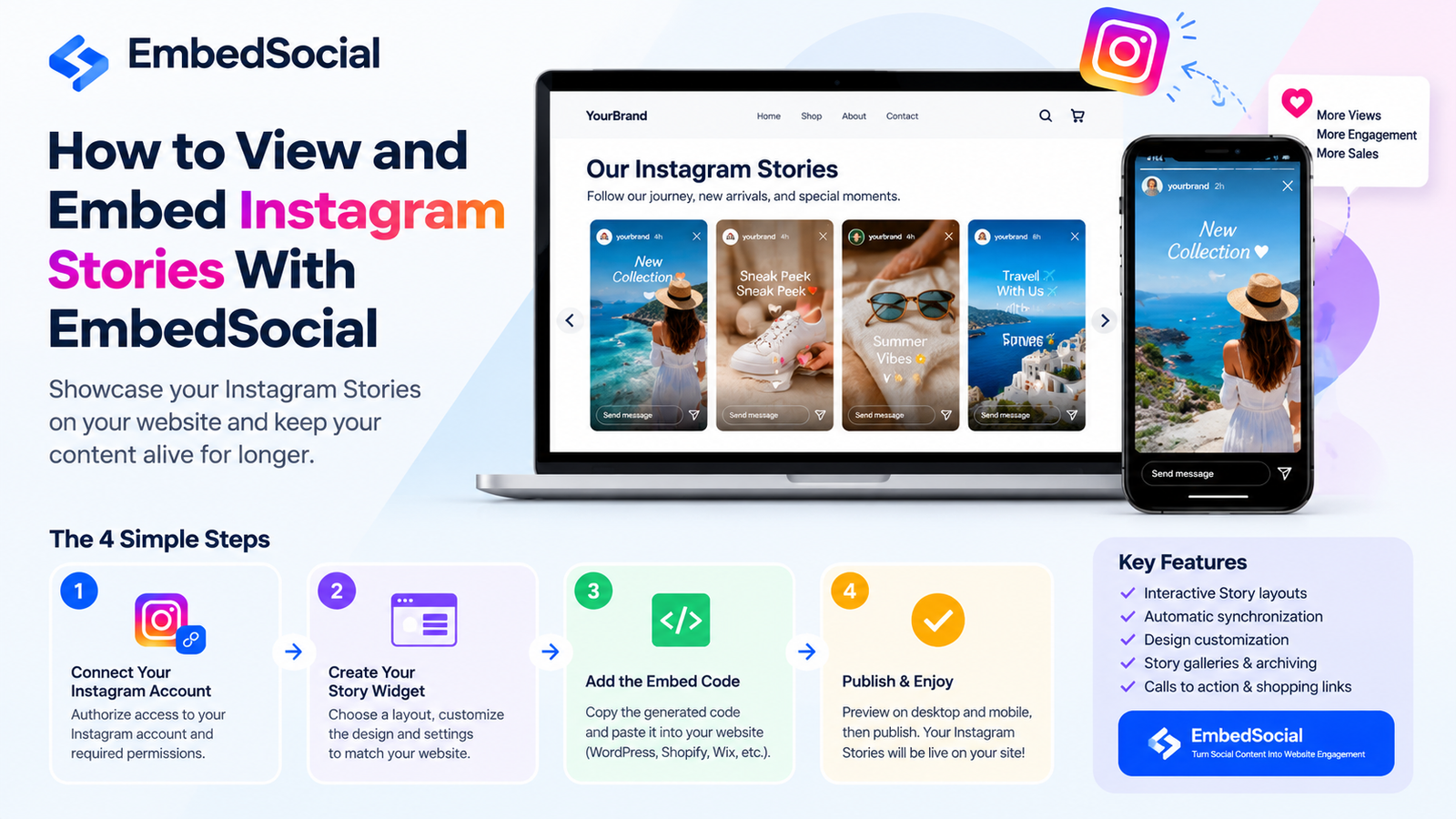
Instagram Stories are a popular way for businesses, creators, and brands to share product updates, promotions, announcements, and everyday moments. However, Stories normally disappear from public view after 24 hours, which limits how long they can attract attention. Embedding them on a website offers another way to showcase this content to visitors.
The EmbedSocial Instagram Story Viewer is commonly used to describe EmbedSocial’s Instagram Stories widget, a tool that helps businesses display their authorized Instagram Story content on their websites. Instead of asking visitors to leave a website and open Instagram, businesses can present Stories directly on relevant pages.
This guide explains how EmbedSocial works, how to add Instagram Stories to a website, what features to consider, how pricing works, and which limitations matter before choosing the platform. It also clarifies an important distinction: embedding your own Stories is different from anonymously viewing other people’s Instagram Stories.
What Is EmbedSocial Instagram Story Viewer?

EmbedSocial is a social media content platform that provides tools for collecting and displaying content from connected social accounts. Its Instagram Stories product, called EmbedStories, allows businesses to create a Story-style widget and publish it on a website.
The widget presents visual content in a familiar format, allowing website visitors to open and browse available Story slides. Depending on the product configuration, businesses can customize the layout, navigation, and appearance to fit their website design.
For example, an online clothing store could display product launches and seasonal promotions on its homepage. A restaurant could feature food photos, special menus, and event announcements. These additions help businesses reuse social media content beyond Instagram itself.
EmbedSocial also offers other social media widgets, including Instagram feeds and content displays for supported platforms. Therefore, it is important to select the Stories product if your primary goal is to showcase Instagram Stories rather than ordinary Instagram posts.
| 🔗 You may also like: |
| SEO by Highsoftware99 Com |
| Adstotally Com |
How Does EmbedSocial Instagram Story Viewer Work?
The process generally involves connecting an eligible Instagram account, creating a widget, customizing its appearance, and adding the generated code to a website.
After setup, the widget can synchronize supported content from the connected account. This reduces the need to upload each Story manually, although synchronization frequency depends on the plan, integration, and product settings.
The basic workflow includes four stages:
- Account connection: Authorize access to the Instagram account or supported content source.
- Widget creation: Choose a Story layout and configure the display.
- Website integration: Copy the embed code or use a supported WordPress plugin.
- Ongoing management: Check synchronization, update the design, and monitor the widget’s performance.
EmbedSocial documents options for displaying Instagram Stories on WordPress through an embed code or its plugin. Its product documentation also describes automatic updates and Story display settings. Check the current requirements before connecting your account.
How to View Instagram Stories With EmbedSocial
The right method depends on what you want to accomplish. If you want to browse Stories on Instagram, use Instagram directly. If you want to display your brand’s Stories on your website, use EmbedSocial.
Step 1: Define Your Purpose
Start by deciding whether you want to view Stories, showcase your own content, or create a reusable display for visitors.
For personal viewing, open Instagram, visit a profile, and select its active Story. When you watch a Story while logged in, your view may appear in the account owner’s viewer list.
For business use, EmbedSocial is designed to bring authorized social content onto your website. It should not be confused with a third-party anonymous Story viewer.
Step 2: Connect Your Instagram Account
Visit the official EmbedSocial website and create an account. Choose the Instagram Stories or EmbedStories product that matches your needs.
Follow the connection instructions presented in your dashboard. Depending on the current integration, you may need an eligible Instagram account, appropriate permissions, and access to the associated Facebook Page.
Grant only the permissions necessary for the service to work. If the account connection fails, check your account type, Page access, and authorization settings before attempting to reconnect.
Step 3: Create Your Story Widget
After connecting your account, choose the Stories widget and review the available layouts. The design should complement your website rather than compete with its main content.
Depending on the product and plan, configuration options may include a slider, lightbox, Story list, navigation controls, colors, and other display settings. Select a format that makes it easy for visitors to discover the content.
For example, a fashion website might place a compact Story slider near its featured products. A travel business could use a larger visual display to showcase destinations and customer experiences.
Step 4: Preview and Test the Widget
Before publishing, check that the Stories display correctly and that the navigation works. Review the widget on both mobile and desktop screens.
Make sure the content is relevant to the page where it appears. A widget featuring product demonstrations may work well on a product category page, while company updates may be more suitable for a homepage or About page.
Step 5: Publish the Widget
Copy the generated embed code or follow the instructions for your website platform. Once the code is installed, open the published page and verify that the widget loads correctly.
After publication, revisit the page when you upload new Stories to confirm that synchronization is working as expected. Update your settings if the display does not match your website’s design.
| 🔗 You may also like: |
| Grammarvista Com USA |
| Techtrendery Com USA |
How to Embed Instagram Stories on a Website
One of EmbedSocial’s main purposes is to make Instagram Story content available beyond the Instagram app. The setup process is relatively straightforward, even for website owners who do not write code.
Embedding Instagram Stories in WordPress
WordPress users can generally choose between a Custom HTML block and a supported EmbedSocial plugin.
- Create your Instagram Stories widget in EmbedSocial.
- Customize the layout and copy the generated embed code.
- Open the relevant WordPress page or post.
- Add a Custom HTML block where the Stories should appear.
- Paste the code and preview the page.
- Publish or update the page after confirming that the widget works.
If you prefer a plugin-based approach, check the official EmbedSocial plugin instructions and use the supported shortcode method where available.
Avoid pasting third-party JavaScript into an ordinary paragraph block. Use the appropriate HTML or integration feature, and check whether your WordPress security settings or page builder restrict external scripts.
Embedding Instagram Stories on Shopify, Wix, and Other Platforms
The general process is similar on other website builders, although the names of the available blocks may differ.
In Shopify, place the widget using an appropriate custom Liquid or HTML integration supported by your theme and setup. In Wix, use a supported embed element. Other website builders may provide an HTML, iframe, or custom-code section.
Before publishing, confirm that your platform allows the required embed method. Some editors restrict JavaScript, and not every integration works identically across all themes or plans.
Key Features of EmbedSocial Instagram Story Viewer
The value of the tool depends on the features available in your selected product and subscription.
Interactive Story Layouts
A Story-style interface gives visitors a familiar way to browse visual content. Instead of scrolling through a long page of images, users can open individual slides and move through the available material.
Different layouts can suit different purposes. A slider saves space, while a larger lightbox-style presentation emphasizes the visual experience.
Automatic Content Synchronization
Automatic synchronization can reduce the effort required to keep website content current. When supported Stories are connected and imported successfully, the widget can update without requiring a new manual upload for every post.
However, updates may not happen instantly. The frequency depends on the applicable plan and integration, so businesses should check the current service limits.
Design Customization
A website widget should look like part of the website rather than a separate advertisement. EmbedSocial provides customization options for its Stories product, with the exact controls depending on the product configuration.
Consider the widget’s dimensions, spacing, navigation, and colors. Keep the design consistent with your website’s existing style and make sure the content remains easy to use on smaller screens.
Story Galleries and Archiving
Keeping Story content available beyond its original Instagram viewing period can help businesses reuse useful material. EmbedSocial’s published product information describes Story archiving and gallery-style displays.
Availability and behavior may depend on the selected product and plan. Do not assume that every Instagram Story, highlight, or previously expired item will automatically become available. Confirm the archive and retention options before relying on them for long-term content storage.
Calls to Action and Shopping Opportunities
Businesses can use visual content to guide visitors toward a relevant next step. Depending on the available widget features, a Story display may support links or custom call-to-action buttons.
For example, a retailer might connect a product promotion to its product page, while a service provider could direct visitors to a booking page. Test each link before publishing, and make sure the destination matches the message in the Story.
Benefits for Businesses, Creators, and Website Owners
Embedding Instagram Stories can help businesses get more value from content they already produce.
E-commerce Stores
Online retailers can feature new arrivals, product demonstrations, seasonal promotions, and customer experiences. Displaying these visuals near relevant products may help shoppers discover items and understand how they are used.
For the best results, use clear product images and relevant links. Avoid filling product pages with so many social widgets that they distract visitors from essential buying information.
Restaurants and Hospitality Businesses
Restaurants can showcase menu highlights, daily specials, events, and behind-the-scenes content. Hotels and travel businesses can feature rooms, destinations, facilities, and experiences.
This approach helps visitors see recent visual content while exploring the website. Businesses should still keep important information, such as prices, opening hours, and booking details, available as readable website text.
Agencies and Marketing Teams
Agencies managing several brands may use Stories widgets to present social content on different client websites. A centralized workflow can reduce repetitive work and help maintain consistent presentation.
Before selecting a plan, calculate how many accounts and websites need the widget. Also check usage limits, team access, and any features required for client reporting.
Bloggers and Content Publishers
Publishers can use Story widgets to support articles, event coverage, interviews, or other visual content. A well-placed widget may provide useful context or encourage readers to explore a brand’s social presence.
However, an embedded widget should complement the article rather than replace its main information. Keep important explanations in the page’s regular text so visitors can access them without interacting with the widget.
Is EmbedSocial Instagram Story Viewer Anonymous?
No. EmbedSocial’s Instagram Stories widget is primarily designed to display authorized Story content on a website. It is not an anonymous viewer that lets you secretly browse any Instagram profile.
If you watch another account’s Story through Instagram while logged in, your view may be visible to the account owner. Embedding your own Stories on a website does not change Instagram’s normal viewer-list behavior.
Third-party sites that advertise anonymous viewing are separate services and may have different technical limitations and privacy risks. They generally cannot legitimately bypass access restrictions on private accounts. Avoid services that request your Instagram password unnecessarily or promise unrestricted access to private content.
For businesses, the safest approach is to use authorized integrations and respect the privacy and permissions of the accounts whose content you display.
EmbedSocial Instagram Story Viewer Pricing
Pricing is an important consideration when choosing a social media widget. EmbedSocial offers free and paid plans across its product range, but the available sources, monthly usage limits, and features differ by subscription.
Its official plan documentation lists a free tier with limited usage and paid plans beginning at $29 per month. The current pricing page may show different billing currencies or product-specific terms, so check the latest details before subscribing.
Review these factors before making a decision:
- Number of sources: How many social accounts can you connect?
- Monthly widget views: How many times can visitors load your widgets?
- Content limits: How much content can be imported from each source?
- Synchronization: How frequently does the content refresh?
- Advanced features: Are customization, analytics, and other required tools included?
A free option may be enough for a small website or initial test. A larger business may need a paid plan with higher usage limits. Choose based on actual website traffic and account requirements rather than paying for features you will not use.
You can review the latest information on the official EmbedSocial plans page.
Common Problems and How to Fix Them
Even a properly configured widget can encounter connection or display issues. Checking the basics can often identify the cause.
Instagram Stories Are Not Showing
First, confirm that the correct account is connected and that the required permissions remain active. Check whether eligible Story content is available and whether the widget settings are filtering it out.
If the connection has expired or access has changed, follow the dashboard instructions to reconnect the account.
New Stories Are Not Appearing
Synchronization may take time. Check the update frequency included in your plan and allow the widget to refresh before assuming it is broken.
If the content remains outdated, review the source connection, refresh settings, and any date-based filters. Clear your website cache if the page is still displaying an older version.
The Widget Does Not Display Correctly on Mobile
Test the page on an actual phone and check the width, spacing, and navigation. Review whether your theme or page builder is applying conflicting CSS.
If the problem persists, temporarily test the widget in a simpler page layout. This can help determine whether the issue comes from the widget itself or another website component.
The Embed Code Does Not Work
Make sure you copied the complete code and placed it in a block that supports the required embed method. Some WordPress security plugins, hosting configurations, or page builders may remove or restrict scripts.
If the issue continues, consult the official documentation or contact EmbedSocial support with the page URL and a description of the problem.
Does EmbedSocial Affect Website Speed and SEO?
A third-party widget can add scripts, network requests, and visual elements to a webpage. The effect on speed depends on the widget, hosting environment, page design, and other scripts running on the site.
Before adding the widget to important landing pages, compare performance measurements before and after installation. Check mobile loading, layout shifts, and whether the widget delays the main content.
From an SEO perspective, do not rely on embedded Stories to provide all the important information on a page. Search engines may not process every piece of content inside a third-party widget in the same way as ordinary HTML text.
Write descriptive headings, useful explanations, image alt text where appropriate, and relevant internal links directly into the webpage. Use the Stories widget as a visual addition rather than a replacement for substantial page content.
Best Practices for Using EmbedSocial Effectively
A successful widget should have a clear purpose and support the user’s journey through the website.
- Choose relevant content: Feature Stories that match the page topic and audience.
- Keep the display organized: Avoid placing too many widgets in a small area.
- Use mobile-friendly layouts: Check touch controls and readability on smaller screens.
- Add useful links: Direct visitors to relevant products, services, or information where supported.
- Monitor performance: Review page speed and widget engagement where suitable analytics are available.
- Respect content rights: Obtain appropriate permission before reusing customer-created content or material from other people.
- Review subscription limits: Check the plan’s usage caps and synchronization frequency as your site grows.
For example, a skincare store could feature product demonstrations on a category page, link visitors to the products shown, and monitor whether the widget contributes to useful clicks. This gives the business a measurable reason to keep or adjust the feature.
| 🔗 You may also like: |
| Uploadarticle |
| DigitalRGS Everything Apple |
EmbedSocial vs. Anonymous Instagram Story Viewers
These tools may appear similar in search results, but they serve different purposes.
EmbedSocial is designed to bring authorized social content onto your website. Anonymous Story viewer websites, by contrast, claim to let users browse available Stories without appearing in Instagram’s viewer list.
The distinction matters because the tools have different requirements, limitations, and privacy considerations. EmbedSocial is a more relevant option for a business that wants a branded website widget, automatic content updates, and a managed display.
If your only goal is to watch public Instagram Stories, the EmbedSocial widget is not the right product for that task. Use Instagram’s normal viewing features when appropriate, and treat third-party anonymity claims cautiously.
Conclusion
The EmbedSocial Instagram Story Viewer is worth considering for businesses that regularly publish Instagram Stories and want to showcase that content on their websites. Its main purpose is to make connected social content available in an interactive, customizable display without requiring constant manual uploads.
The tool may suit e-commerce stores, restaurants, service providers, agencies, and publishers that want to reuse visual content across multiple channels. However, the best plan depends on the number of sources, monthly widget views, synchronization requirements, and features your website needs.
Before paying, test the widget on a real page, check how it looks on mobile, confirm that updates work, and measure its effect on performance. Review the current plan terms and make sure the product matches your actual goal.
Most importantly, remember that embedding Stories and viewing Stories anonymously are different activities. Choose EmbedSocial for website integration, not for secretly viewing other people’s Instagram Stories.
FAQs
What is EmbedSocial Instagram Story Viewer?
It is a common search term for EmbedSocial’s Instagram Stories widget, which helps businesses display authorized Instagram Story content on their websites.
Can I view Instagram Stories anonymously with EmbedSocial?
No. EmbedSocial’s Stories widget is intended for website embedding, not anonymous browsing of other Instagram accounts.
How do I embed Instagram Stories on WordPress?
Create a Stories widget in EmbedSocial, copy its embed code, and paste it into a WordPress Custom HTML block. Alternatively, follow the supported plugin and shortcode instructions.
Does EmbedSocial update Instagram Stories automatically?
EmbedSocial documents automatic synchronization for connected Stories. The actual update frequency depends on the product, subscription, and integration.
Can I use EmbedSocial with Shopify or Wix?
EmbedSocial supports website embedding across multiple platforms. Check the current integration instructions for Shopify, Wix, or your specific website builder before installing the widget.
Does EmbedSocial have a free plan?
Yes. EmbedSocial’s official documentation describes a free plan with limited sources and usage. Paid plans offer higher limits and additional capabilities.
Can EmbedSocial display Stories after 24 hours?
EmbedSocial’s product information describes Story archiving and display options. Availability depends on the product configuration and plan, so confirm the current retention features before relying on them.
Is EmbedSocial safe to use?
Use the official service, review the requested account permissions, and read its privacy terms before connecting an account. As with any third-party website widget, also consider the scripts and data requests it introduces to your site